Guides
Golden Dragon Sign Up: How to Create or Connect Your Account
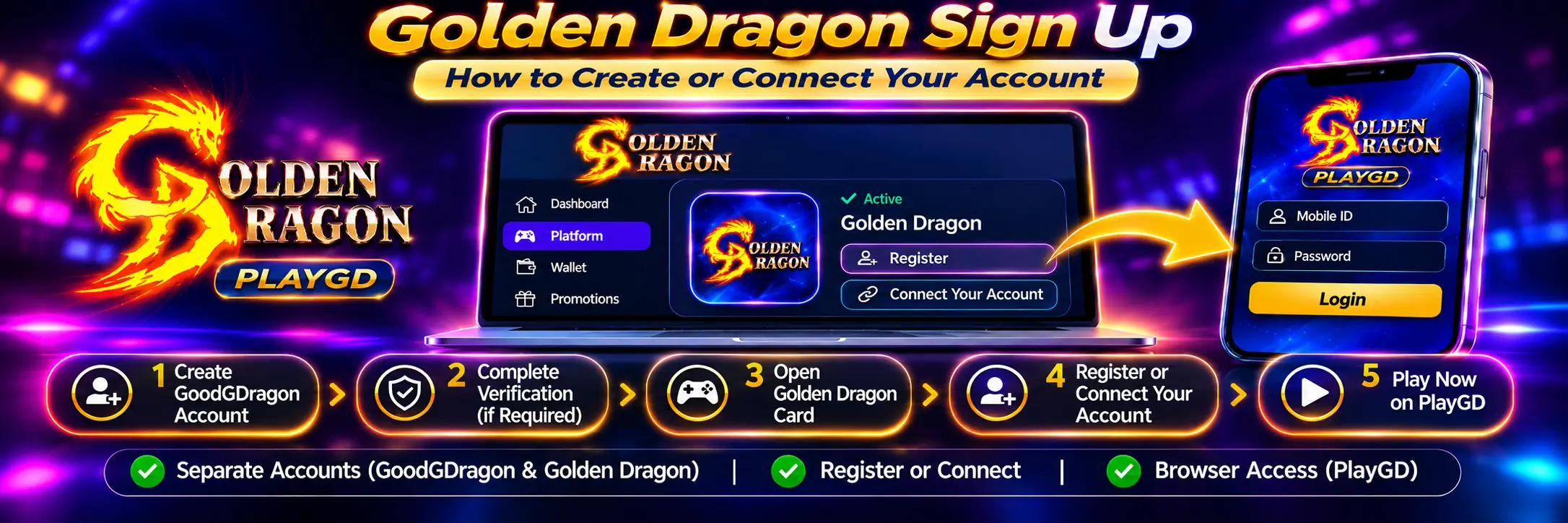
If you’re trying to sign up for Golden Dragon, start inside your GoodGDragon account rather than searching for a PlayGD registration page.
Golden Dragon’s own site markets an easy sign-up, while many independent providers found in search use an agent-based account model. The public picture is inconsistent — but if you’re going through GoodGDragon, the answer is simpler: you can create a GoodGDragon account yourself, then set up the Golden Dragon game account from the platform card. No agent is required for the GoodGDragon route.
Two accounts are involved, and keeping them straight saves most of the confusion:
- Your GoodGDragon account — the website, your wallet and the platform lobby
- Your Golden Dragon game account — the PlayGD platform, with its own credentials
They are not interchangeable, and one will not sign you into the other.
Golden Dragon Sign Up: Starting From Scratch
If you don’t have either account yet, here’s the full sequence.
1. Create Your GoodGDragon Account
Create your main GoodGDragon account using the signup option available on the site.
You don’t need an invitation or a Golden Dragon agent to create the GoodGDragon account.
2. Complete Any Verification Steps Shown
GoodGDragon may ask you to verify account details during registration.
Follow the prompts displayed in your own account, since verification requirements can vary.
3. Open the Platforms Area
Sign in and find the Golden Dragon platform card.
You can also review the current Golden Dragon platform page for the account and wallet flow.
4. Set Up the Golden Dragon Game Account
Use the setup option displayed on your card:
- Register — starts setup for a new game account
- Connect Your Account — links a game account you already have
Which option appears can depend on your account and the platform’s current configuration, so follow what your own card displays.
5. Get Your Game Credentials
Once the platform account is ready and connected, the Golden Dragon card displays the game-account credentials available to you.
6. Open Golden Dragon
Select Play Now from the platform card and use the displayed Golden Dragon credentials when the PlayGD sign-in screen appears.
Steps one and two relate to your main GoodGDragon account. The Golden Dragon setup that follows relates to the separate game account.
Do You Need a Golden Dragon Agent?
Not when you’re going through GoodGDragon.
Search this topic and many results tell users to contact an agent who creates an account and supplies credentials. Those instructions describe the account model used by those particular providers.
That is not a universal Golden Dragon signup rule.
Golden Dragon accounts can be provided through different services, so the setup process depends on the provider you’re using. Through GoodGDragon, the connected game-account process begins from your signed-in platform card.
Some other Golden Dragon-branded providers also state a 21+ minimum. That is their own requirement.
GoodGDragon requires players to be at least 18, or the age of majority in their jurisdiction if higher, subject to location, eligibility and the current Terms and Conditions.
GoodGDragon Account vs Golden Dragon Account
These are separate accounts.
| GoodGDragon | Golden Dragon | |
| What it’s for | Website, wallet, platform lobby | PlayGD game access |
| Credentials | GoodGDragon login credentials | Game ID and game password |
| Where you use it | goodgdragon.com | PlayGD sign-in screen |
| Balance | GoodGDragon SC wallet | Separate game balance |
Your GoodGDragon login will not sign you into the PlayGD game client.
Golden Dragon expects the separate game-account credentials associated with the Golden Dragon platform card.
This is a common source of Golden Dragon login confusion.
If you already have your game credentials and only need help accessing the platform, see the Golden Dragon login guide.
How to Set Up the Golden Dragon Game Account
Everything starts from the platform card.
Open Golden Dragon and use whichever setup option is currently displayed.
Register
Register starts the setup process for a new Golden Dragon game account.
It does not necessarily mean that usable credentials will appear instantly.
Connect Your Account
Use Connect Your Account when you already have a game account that the GoodGDragon connection flow accepts.
Do not enter your main GoodGDragon credentials into this form.
What Happens When You Register?
In the GoodGDragon flow checked for this guide, Register submitted an account request rather than creating credentials instantly.
The platform card displayed a pending status saying:
Your request has been submitted. We’re working on it — credentials will appear here when ready.
Platform configuration can change, so follow the status shown on your own card.
In the flow checked for this guide, the credentials appeared on the platform card once the account was ready. Follow the delivery and status information shown in your own account rather than assuming every setup will behave identically.
While the Request Is Pending
Avoid submitting another request while the first is still shown as pending unless GoodGDragon Help or support advises you to.
An account obtained elsewhere is also not automatically connected to your GoodGDragon wallet.
If your Golden Dragon card offers Connect Your Account, use that flow and only treat the game account as connected after GoodGDragon confirms the connection.
There is no published universal timeframe for how long the registration process takes. If the status remains unresolved, use the Help route rather than repeatedly creating new requests.
Connecting a Golden Dragon Account You Already Have
If you already have a Golden Dragon game account, the Connect Your Account option may allow you to link it rather than requesting another game account.
The form asks for game-account credentials such as:
- Game Username — the username used with that game account
- Game Password — the corresponding game password
These are not your GoodGDragon login details.
Use the same credentials associated with the game account you are trying to connect.
Once submitted, follow the card status to see whether GoodGDragon confirms the connection.
An account obtained through another provider should not be treated as connected until that confirmation appears.
Enter these credentials only through the setup flow inside your signed-in GoodGDragon account. Do not send game credentials through private messages or to an unsolicited third party.
What Is Your Golden Dragon Game ID?
Once the game account is connected, the Golden Dragon platform card displays your Game ID.
On the PlayGD sign-in screen, the corresponding field may be labelled Mobile ID.
Use the value currently shown on your Golden Dragon card.
Your Golden Dragon Game ID is not:
- Your GoodGDragon email
- Your GoodGDragon password
- Your website username
- Automatically your phone number
The similar labels can be confusing, which is why starting from your connected platform card is important.
What the Connected Golden Dragon Card Shows
A connected Golden Dragon card can display:
- Game ID — your platform account identifier
- Password — the game-account password
- Entries — a field shown on the Golden Dragon card at the time checked
- Recharge — moves eligible SC from your GoodGDragon wallet into Golden Dragon
- Play Now — opens the PlayGD browser client
- Redeem — moves eligible game balance back to your GoodGDragon wallet
Button labels and fields can change, so your signed-in card should remain the source of truth for your account.
How Do You Change a Golden Dragon Password?
Some GoodGDragon platform cards have an account-level password control.
For example, some use Reset password?, while Fire Kirin has used Update password?
At the time of checking, the Golden Dragon card did not show the password-change link available on some other platform cards.
If the current PlayGD sign-in screen offers a password-recovery option, follow that on-screen process.
If it doesn’t, use GoodGDragon Help rather than sending credentials to an unofficial third party.
What If Your Golden Dragon Details Aren’t Showing?
A missing Game ID does not automatically mean you need another account.
Check these first:
- See whether your registration request is still marked as pending.
- Confirm Golden Dragon is still listed in your GoodGDragon platform lobby.
- Reopen the platform card and read the current status message.
- Sign out of GoodGDragon and sign back in if the account interface appears stale.
- Confirm you are using goodgdragon.com, not another site using the Golden Dragon name.
If the issue remains unresolved, use the GoodGDragon Help route.
Can You Create More Than One Golden Dragon Account?
Don’t assume so.
The published GoodGDragon setup information does not establish a general allowance for multiple Golden Dragon game accounts.
Use your existing connected account where possible and check the current Terms or ask support before requesting another.
Can You Sign Up for Golden Dragon on a Phone?
Yes. The GoodGDragon route can be handled through a mobile browser.
The process is the same:
- Open GoodGDragon.
- Create or sign in to your main account.
- Complete any verification prompts shown.
- Open the Golden Dragon platform card.
- Use the available Register or Connect option.
- Open the connected platform through Play Now.
No separate native app is required for this GoodGDragon route because Golden Dragon opens through the PlayGD browser client.
The Golden Dragon app and mobile access guide explains this browser-based route and why third-party Golden Dragon APK/download pages should not automatically be trusted.
Is There a Golden Dragon Signup Bonus?
Creating or connecting a Golden Dragon game account does not guarantee a promotional credit.
GoodGDragon promotions are managed at the account level rather than automatically being awarded because you connected a particular gaming platform.
Promotional rewards may also have:
- Eligibility requirements
- Usage requirements
- Expiry conditions
- Wallet-specific conditions
- Other promotion-specific terms
Check the current Bonus or Promotions area in your account before relying on an offer.
The Golden Dragon free-play and bonus guide explains the current GoodGDragon reward structure and why bonus amounts advertised by unrelated Golden Dragon providers should not be applied to your account.
Who Can Sign Up?
GoodGDragon requires players to be at least 18, or the age of majority in their jurisdiction if higher.
Availability also depends on location, account eligibility and the current Terms. Play is void where prohibited.
GoodGDragon may request verification information where reasonably necessary.
Some unrelated Golden Dragon providers use a 21+ minimum. Their rules apply to their own service, not automatically to your GoodGDragon account.
Golden Dragon Sign Up vs Connect vs Login
These actions mean different things:
| Action | What it means |
| Register | Starts setup for a new Golden Dragon game account |
| Connect | Links an existing compatible game account |
| Login | Signs into a game account that already exists |
If you already have your Game ID and game password, you probably need the Golden Dragon login guide rather than another registration request.
Keep Your Golden Dragon Account Details Safe
- Start setup from your signed-in GoodGDragon account rather than an unsolicited link.
- Enter game credentials only through the platform card’s official connection flow.
- Never give anyone your GoodGDragon password.
- Never send a verification code to another person, including someone claiming to be support.
- Treat unsolicited offers to create or activate an account for you as a risk, especially if they ask for credentials, verification codes or payment outside the official flow.
Starting from your own platform card also helps ensure you reach the PlayGD destination associated with your connected account rather than a different service using the Golden Dragon name.
Golden Dragon Sign Up FAQs
Can I Sign Up for Golden Dragon Myself?
Through GoodGDragon, yes. Create your GoodGDragon account, complete any verification prompts shown, then use the Golden Dragon platform card to start a new game-account setup or connect an existing account when those options are available.
Do I Need a Golden Dragon Agent?
Not for the GoodGDragon route. Some other providers distribute Golden Dragon accounts through agents, but that is their own account model.
Is the Golden Dragon Account Created Instantly?
Not necessarily.
In the GoodGDragon flow checked for this guide, Register submitted a request and the credentials appeared on the platform card once the account was ready.
Follow the current status displayed in your own account.
Can I Use My GoodGDragon Login on PlayGD?
No. Golden Dragon uses separate game-account credentials associated with the Golden Dragon card.
What Is My Golden Dragon Game ID?
It is the account identifier displayed on your Golden Dragon card.
On the PlayGD sign-in screen, the corresponding field may be labelled Mobile ID.
Can I Connect a Golden Dragon Account I Already Have?
Where the card offers Connect Your Account, yes.
The connection flow asks for the credentials belonging to the game account you are trying to link. Only treat it as connected once GoodGDragon confirms the connection.
Do I Need to Download a Golden Dragon App First?
No separate app is required for the GoodGDragon browser route covered here.
Open Golden Dragon through Play Now from your platform card.
Who Can Create a GoodGDragon Account?
GoodGDragon requires players to be at least 18, or the age of majority in their jurisdiction if higher, subject to location, account eligibility and the current Terms.
New to GoodGDragon? Create your account, complete the verification steps shown, then open the Golden Dragon platform card to set up your game account.
Already have your Game ID and password? Open Golden Dragon through Play Now or use the Golden Dragon login guide if you need help signing in.
Players must be at least 18, or the age of majority in their jurisdiction if higher. Availability depends on location and play is void where prohibited. No purchase is necessary to enter or win, and a purchase does not increase your chances of winning. Review the current Terms and Conditions and Responsible Gaming information before participating.